

OpenHaldex SS

Bored Systems project · OpenHaldex SS v1.1

OpenHaldex SS: a DIY Haldex controller for VW and Audi.

About $50 in parts. Six board connections. No coding.

OpenHaldex SS lets you choose when and how strongly your rear wheels help out. Build a small controller, plug it into your car's Haldex wiring, and change settings from your phone.

You'll need a LILYGO T-2CAN ESP32-S3 N16R8 board and the correct plug pair. Prewired plugs and the board's screw terminals make the build easier: no soldering and no cutting the car's wiring.

Free official firmware under the personal-use software terms. No account or subscription required.
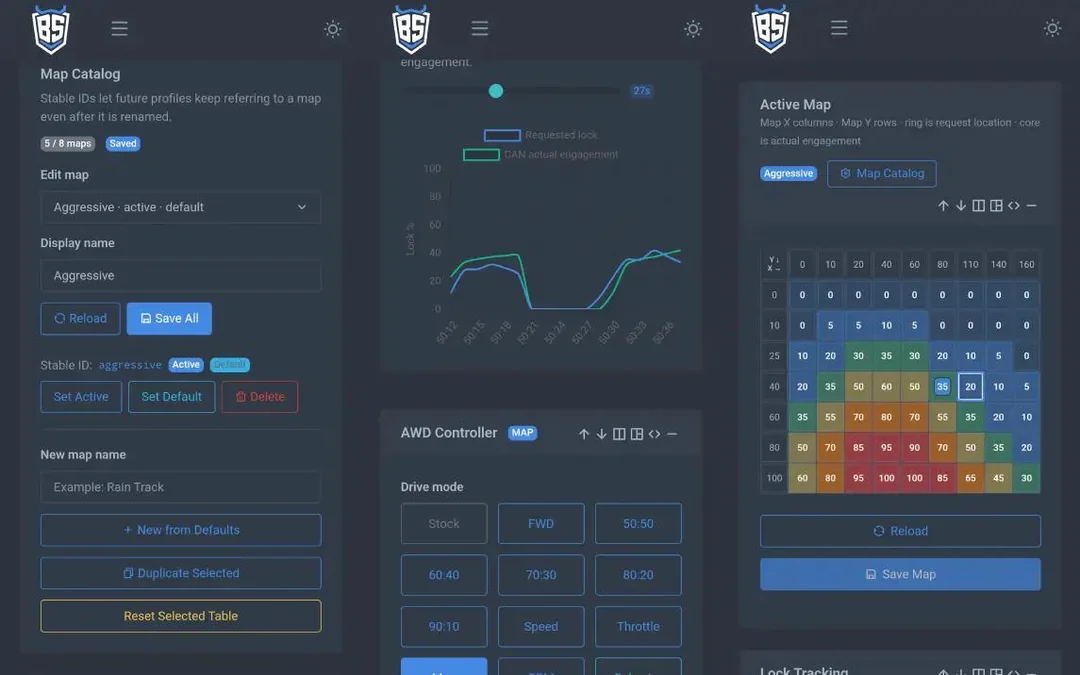
OpenHaldex SS phone dashboard showing Haldex AWD controls
The phone dashboard: pick a mode, edit a map or see what the car is doing.

How do I build it?

1. Get the board and plugs

Buy the T-2CAN N16R8 and a prewired plug pair for your Haldex generation. Add a small screwdriver, USB data cable and enclosure. The parts checklist explains which plugs you need.

2. Connect six labeled wires

The board needs power, ground and two wires from each side of the Haldex connection. Match the labels and tighten the screw terminals using the official wiring guide.

3. Install it and try a mode

Use the browser USB installer, plug your finished harness inline and open the phone dashboard. Start in Stock mode and follow the first-start checklist.

A harness is just the short set of wires and plugs joining the controller to the car. Use the guide for your generation, check your connections and put the board in an enclosure.

Does it fit my car?

SS works with Haldex Gen 1, Gen 2, Gen 4 and Gen 5 systems in supported Volkswagen, Audi, SEAT, Škoda and Cupra cars.

Common examples

VW R32, Haldex-equipped Golf R, Tiguan, Alltrack and 4Motion SportWagen; Audi A3, S3, TT, TTS, TT RS, Q3 and Haldex-equipped RS3 and RS Q3.

Check your model before buying parts

Mk8 Golf R and 8Y RS3 torque-splitter systems are not currently supported. Those use a different rear-drive system. Use the official car compatibility guide to check yours.

Manual transmission? Yes, that's supported too. The exact model and Haldex generation matter more than the badge on the back.

What can I do with it?

Pick a mode

Start with Stock, FWD or a fixed engagement setting. Stock passes the car's original Haldex messages through unchanged.

Try a map

A map is a table that asks for more or less rear-wheel help based on things like speed and throttle. Start with a supplied map, then edit and save your own.

Let it switch for you

A profile is a saved set of rules for changing AWD behavior automatically. You can explore those later, once you're happy with a basic setup.

The dashboard also shows live car info, saves logs and offers diagnostics supported by your Haldex unit.

The settings ask Haldex to engage more or less; they don't guarantee an exact front/rear power split. Configure the GUI and review logs only while safely parked.

Quick questions

Do I need to know how to code?

No. The official installer puts the firmware on the board from your browser. You change settings in the phone dashboard.

Do I have to cut the car's wires?

No. The build uses a matching plug pair to sit between the car and Haldex. Buy prewired plugs to skip soldering; bare plug shells need terminals crimped onto wires.

Can I unplug it and go back to stock?

Yes. Remove the OpenHaldex harness and reconnect the original factory plugs.

Where do I get the firmware or help?

openhaldex.dev has the official SS firmware and wiring instructions. The OpenHaldex community is a good place for build questions and sharing what you've made.

Built by Bored Systems. Made for DIY fun.

Start with the simple build and a supplied map. When you feel like exploring, the extra controls are there. Share your build or find a walkthrough:

Already using OpenHaldex? SS v1.1 update notes

Version 1.1 adds settings backup and restore, plus an optional setting to reduce engagement as you turn the steering wheel. It also adds experimental Gen 5 0CQ 554K BPK support, with vehicle validation pending.

Switching from S3 or an early test build? Save your maps and settings first, then install SS by USB. Later SS wireless updates keep saved user data.

v1.1 release notes · Current release details · Install and update guide

Software terms and older S3 builds

The SS application is proprietary; official firmware is free for personal, non-commercial experimental or off-road use under its software terms. SignalScope API is a separately MIT-licensed framework, not a source-code license for SS.

Legacy OpenHaldex-S3 is a separate MIT-licensed project. Its downloads and developer archive describe the older S3 edition.

Updated for SS v1.1 on October 11, 2026. OpenHaldex SS is an independent Bored Systems project.

© Bored Systems
Theme Settings
Color Scheme
Light
Dark
Layout Mode
Fluid
Boxed
Topbar Color
Light
Dark
Menu Color
Light
Dark
Layout Position